**Environment:**
- Cribl Version: 4.18.1
- Leader: AWS eu-west-1, behind internal NLB (port 4200)
- Outpost: On-prem Linux server
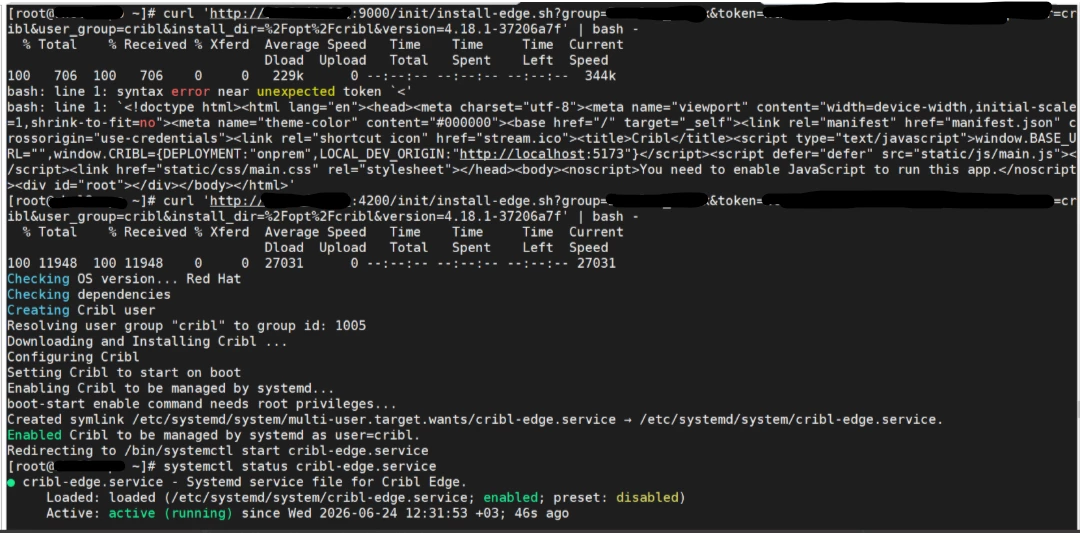
Background: We are deploying Cribl Edge nodes on-prem. The generated bootstrap script points to the Outpost server on port 9000 (default). When we run the script as-is, the `/init/cribl-edge` endpoint returns an HTML page (the Cribl Web UI) instead of a shell script:
But when we modified the bootstrap script to use port 4200 instead of 9000, pointing to the same Outpost server. With port 4200, the `/init/cribl-edge` endpoint returns the correct shell script, the Edge node installs successfully, and it connects and reports to the Leader as expected.
Question:
Is it expected/by design that the Edge bootstrap endpoint `/init/cribl-edge` only works on port 4200 (the distributed communications port) and not port 9000 (the web UI/API port) on an Outpost server?
The default generated bootstrap script uses port 9000. Is this a bug in the script generation, a misconfiguration on our end, or is there a specific configuration required to enable the bootstrap endpoint on port 9000 of an Outpost?
We could not find any Bootstrap URL or Outpost URL field in the Edge Fleet Settings UI to configure this explicitly.
Our instance.yml on the Outpost confirms correct config:
distributed:
mode: outpost
master:
host: <LB>
port: 4200
tls:
disabled: true
group: <Outpost Name>