Question

How to remove the null elements of an array

  • March 11, 2025
  • 9 replies
  • 260 views

I have some JSON that I've extracted via a parser function, manipulated/renamed some fields, and now I have an element of an array that is null. Can anyone point me in the right direction on how I might clean up the null? For reference, my end destination is a GCP storage bucket, so I'm just writing the data out as a raw JSON string.It seems I can serialize the fields back into _raw (which cleans up the null array element), and then extract again, and then remove _raw, but that feels like it is potentially inefficient, 3 step process. Is there a better way to accomplish this?

9 replies

  • Participating Frequently
  • March 11, 2025

Try a Parser() function at the end of the Pipeline.Type=JSON ObjectSource field=`_raw`Destination field=`_raw`Fields Filter Expression=`value != ''`


  • Inspiring
  • March 6, 2026

Same question as the original poster, but new user here so please be gentle
JSON data gets extracted out of _raw and in the pipeline, in the preview pane I see both _raw as well as a bunch of top-level fields extracted out of _raw.
I want to delete _raw, remove fields with null values, re-serialize it and sent it to my destination.
Parser() function as recommended above works when i give it _raw as the source and destination, so I know the logic is sound, but how do I remove any top-level fields which I see in Preview on the right. They are already extracted and contain null values. What the OP said seems like an idea, but is that efficient?


Jon Rust
Forum|alt.badge.img
  • Employee
  • March 7, 2026

Hi gportnoy!

You wan to use the field filter expression. Only fields that return true from the expression will be kept. So you’d want to use something like this as the expression (literally) will drop any empty fields and any field equal to literal null value or ‘null’ as a string. Adjust as required.
 

value!='' && value!=null && value!='null'


  • Inspiring
  • March 7, 2026

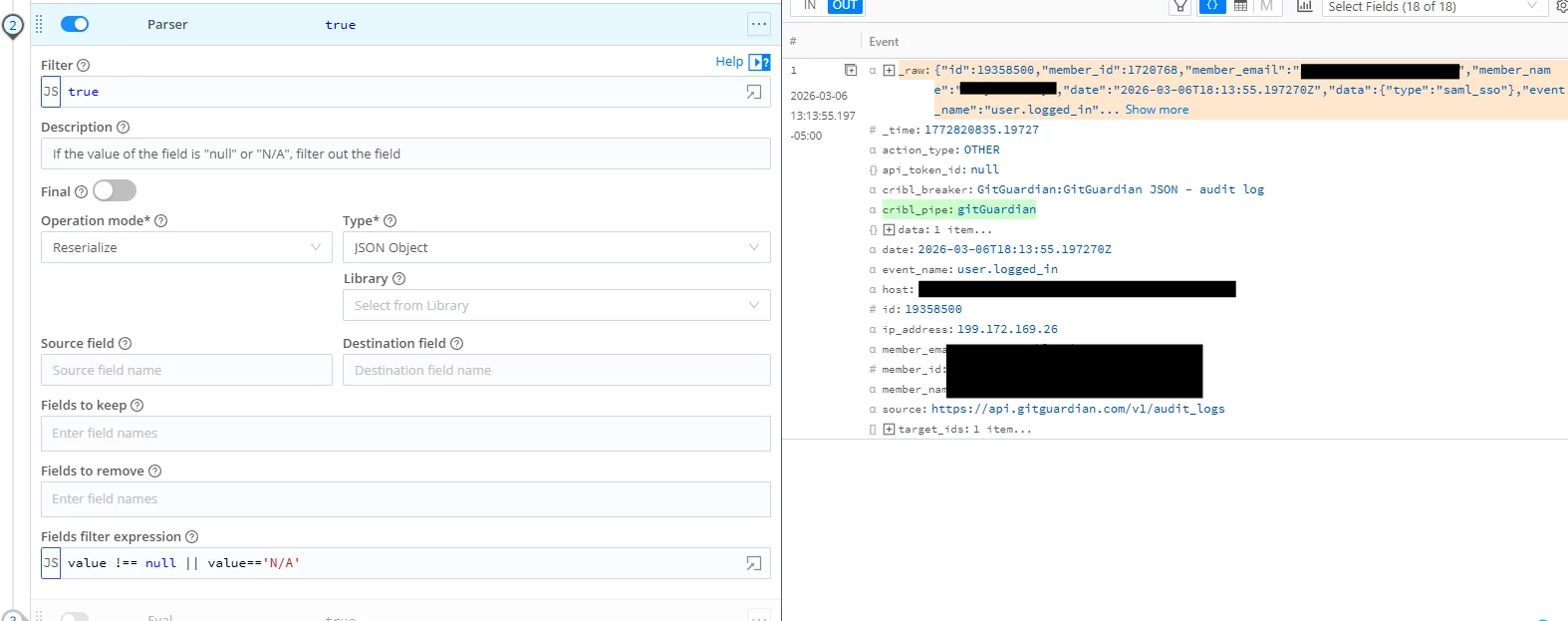
Thanks ​@Jon Rust . That’s kind of what I am trying but I am not seeing this have the effect in the preview. Here is what I have. With these settings (Operation mode: Reserialize, Type: JSON Object) it doesn’t seem to be acting on the top-level fields. Everything I try seems to be acting on _raw, but I delete _raw further down in this pipeline, so I am actually just trying to act on the already extracted top-level fields. 

Any suggestions for how to check the top level fields and delete them if empty?


Jon Rust
Forum|alt.badge.img
  • Employee
  • March 8, 2026

I’m not sure I’m following the process at this point. Back up one step in your pipeline. It sounds like you’ve already extracted top level fields from _raw? Can you share the entire pipeline? And a better description of what you want as the end result?


Jon Rust
Forum|alt.badge.img
  • Employee
  • March 8, 2026

More background: The Parser function can be used in 2 primary ways. 

  1. Extract fields out of a string field into new fields. Those new fields can be top level, or under another field -- even the original (overwriting it). This is Extract mode.
  2. Extract fields out of a string field, then re-write them as string again. You can target a new field, or the original as the destination, overwriting it. This is Reserialize mode.

If your goal is to keep raw as a string, but clean up the empty and null values, use 1 Parser function in Reserialize mode with _raw as the source and destination.


  • Inspiring
  • March 9, 2026

Thanks ​@Jon Rust . Perhaps this is just my ignorance of best practices showing…

I am setting “JSON extract fields” to Yes in the event breaker, so by the time the event gets to the pipeline it already has the actual extracted fields in addition to _raw. My goal is to remove empty fields, remove _raw and forward to my destination.

As a workaround to my problem I disabled JSON extraction in the event breaker. This way, in the pipeline I can use Parser and Extract from _raw while removing the empty fields.

But my questions still stands and I’d like to know for future reference…. Is there any way, using any function, to check for empty/null fields across all the top-level fields, and if so remove them?


Jon Rust
Forum|alt.badge.img
  • Employee
  • March 9, 2026

Aha! Thanks for the clarification. No parsing at EB stage is one way to handle this. But we don’t have a built-in function to loop through the fields and drop those that are empty or null. You could gen up a Code function to do it though.

I’ve provided 2 sample Code functions below. Please test thoroughly before deploying into anything resembling production. They assume your raw event has been extracted to top level fields. After this Code function, either leave events top level, or use the Serialize function to stringify everything into _raw.

Simple code without any recursion (it won’t descend into objects) and no array logic:

try {
for (let [key, value] of Object.entries(__e)) {
if (value == null || value == '' || value == 'n/a') {
__e[key] = undefined
}
}
} catch (err) {
__e.CRIBLERR = err.message
}

A more complex version that works recursively, only altering arrays if the array is completely empty. 

try {
const clean = (obj) => {
for (const [key, value] of Object.entries(obj)) {
if (value == null || value === '' || value === 'n/a') {
// keep original behavior for "empty" scalars
obj[key] = undefined;
} else if (Array.isArray(value)) {
// don't touch array elements; only remove if array itself is empty
if (value.length === 0) {
obj[key] = undefined;
}
} else if (value && typeof value === 'object') {
// recurse into plain objects
clean(value);

const keys = Object.keys(value);
const allUndefined =
keys.length === 0 ||
keys.every((k) => value[k] === undefined);

// if the recursed object is now empty, remove it
if (allUndefined) {
obj[key] = undefined;
}
}
}
};

clean(__e);
} catch (err) {
__e.CRIBLERR = err.message;
}


  • Inspiring
  • March 9, 2026

Thanks ​@Jon Rust I’ll save this for future reference!