

Symptom
The REST Collector retrieves only the first page of results from an API that returns pagination data as a JSON-encoded object within a response header. Subsequent pages are never requested, even though the API returns valid pagination information.
The "Response Body Attribute" pagination option does not work because the pagination data is in a response header (not the body), and the nested properties within the JSON object are never falsely, so a Last Page Expression cannot be reliably used.
Environment
- Product: Cribl Stream
- Version: 4.15.1 and later
- Source type: REST / API Endpoint Collector
- Upstream API: REST API that:
- Returns a JSON-encoded pagination object in an HTTP response header (for example,
pagination), and - Expects the next page number or offset to be passed in a request parameter or POST body field (for example,
pageNumber).
- Returns a JSON-encoded pagination object in an HTTP response header (for example,
Resolution
- Navigate to Sources > REST > select the collector.
- Remove or clear any value in the Last Page Expression field. A previously set expression (e.g.,
true) causes the collector to stop after the first page regardless of the API's pagination response. - Set Pagination to Response Header Attribute.
- In Response attributes, add the top-level response header name that contains the JSON pagination object (e.g.,
pagination). - In Collect parameters, add a parameter for the page value using
JSON.parse()to extract the current page from the captured header:
| Name | Value |
|---|---|
| page | ${pagination ? JSON.parse(pagination).currentPage + 1 : 0} |
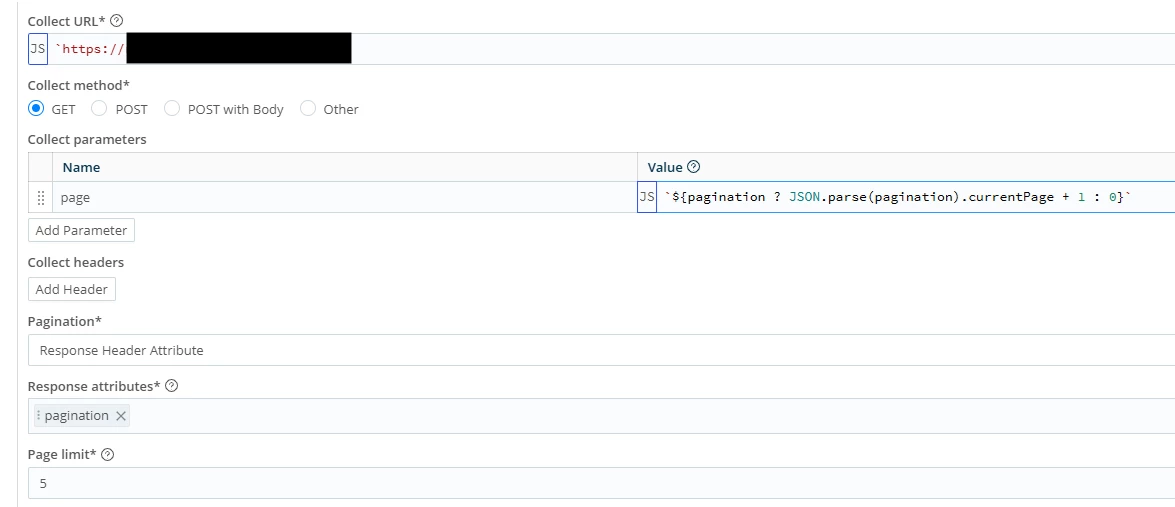
- If the API expects a numeric value rather than a string, wrap the expression with
Number.parseInt():Number.parseInt('${pagination ? JSON.parse(pagination).currentPage + 1 : 1}') - Set Page limit to the desired maximum number of pages to retrieve (e.g.,
5). - To prevent the collector from requesting pages beyond the last available page, enable an Event Breaker on the source and set the advanced collector option
stop on empty resultstotrue. - Click Save and run a preview to verify multiple pages are collected.
Cause
This issue may be cause by the pagination metadata being embedded as a JSON string inside a response header, resulting in the standard Response Body Attribute approach being unable to access the nested pagination properties without explicitly parsing the JSON. Additionally, in this example, the Last Page Expression field was set to true, which immediately signaled that the last page had been reached after the first request.