

Objective
Roll back the code version from newest to older.
Environment
- Linux Worker
Procedure
- In the Cribl UI, go to Settings > Global > Upgrade.
- Turn off (toggle to the left) autoupgrade for the worker group. Make sure that toggle is off.
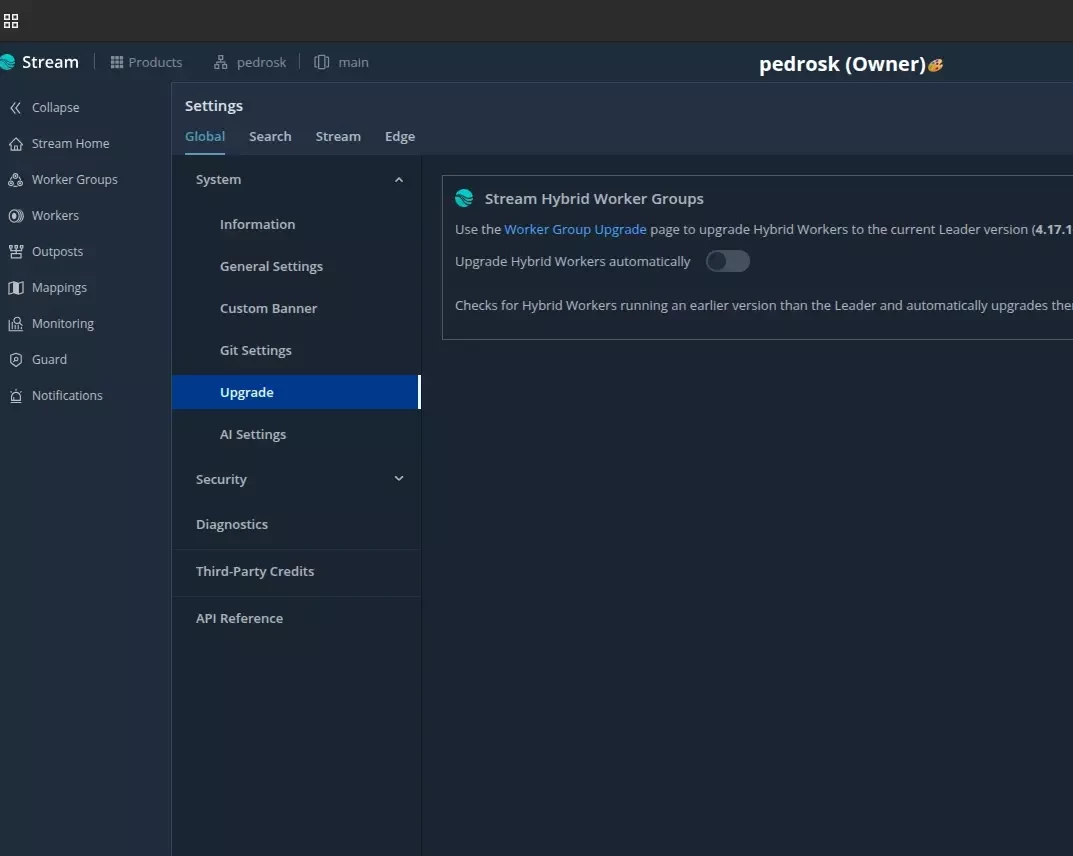
Turn off the auto-upgrade for the workers - Do this one worker at a time.
- As a privileged use either root or as sudo stop cribl:
systemctl stop cribl.service - Wait until everything shuts down and make sure that there are no more processes running: ps -ef |grep -i cribl
ps -ef |grep -i cribl - If anything did not stop by systemctl, kill the process.
- Wait a little and re-check.
- If you no longer see processes running, than procees to backing up and reinstalling:
cd /opt -
Backup:
sudo cp -apr cribl cribl_backup_$(date +%Y%m%d%H%M%S) - Check if the back was made by running
ls -latr - Go to https://cribl.io/download → Past Releases, and pick the previous stable version and correct platform/arch (x64, ARM, etc.), then download the .tgz for Stream.
- Make sure you are still in /opt or just run
cd /opt - Download the tar file to /opt
- Next untar the file in the /opt:
sudo tar -xvf cribl-4.17.0-7e952fa7-linux-x64.tgz - Fix the privileges:
sudo chown -R cribl:cribl /opt/cribl -
Start the process:
sudo systemctl start cribl - Check by running:
ps -ef |grep -i cribl - You can run sudo systemctl status cribl.service to get the status of the service; however, we recommend making sure that the Cribl processes are up.
- Check in UI that the worker is connected. The result should look something like this:

Rolled Back Version Note this will only roll back the code version, not the changes done by commit and deploy.