
Hello,
I’m using Cribl Cloud to pull JSON events from an Azure Event Hub and forward them to Splunk via HEC. Each incoming event contains a nested array field called records, for example:
{
  "records": [
    {
      "FileName": "xx",
      "FileType": "xx",
      "NetworkMessageId": "xx",
      "RecipientEmailAddress": "xx",
      "RecipientObjectId": "xx",
      "ReportId": "xx",
      "SHA256": "xx",
      "SenderDisplayName": "xx",
      "SenderObjectId": "x",
      "SenderFromAddress": "x",
      "FileSize": x,
      "Timestamp": "xx",
      "TimeGenerated": "xx",
      "_ItemId": "xx",
      "TenantId": "xx",
      "_TimeReceived": "xx",
      "_Internal_WorkspaceResourceId": "xx",
      "Type": "xx"
    },
    {
            "FileName": "xx",
      "FileType": "xx",
      "NetworkMessageId": "xx",
      "RecipientEmailAddress": "xx",
      "RecipientObjectId": "xx",
      "ReportId": "xx",
      "SHA256": "xx",
      "SenderDisplayName": "xx",
      "SenderObjectId": "x",
      "SenderFromAddress": "x",
      "FileSize": x,
      "Timestamp": "xx",
      "TimeGenerated": "xx",
      "_ItemId": "xx",
      "TenantId": "xx",
      "_TimeReceived": "xx",
      "_Internal_WorkspaceResourceId": "xx",
      "Type": "xx"
    },
    {
            "FileName": "xx",
      "FileType": "xx",
      "NetworkMessageId": "xx",
      "RecipientEmailAddress": "xx",
      "RecipientObjectId": "xx",
      "ReportId": "xx",
      "SHA256": "xx",
      "SenderDisplayName": "xx",
      "SenderObjectId": "x",
      "SenderFromAddress": "x",
      "FileSize": x,
      "Timestamp": "xx",
      "TimeGenerated": "xx",
      "_ItemId": "xx",
      "TenantId": "xx",
      "_TimeReceived": "xx",
      "_Internal_WorkspaceResourceId": "xx",
      "Type": "xx"
    }
  ],
  "_time": 1756902850.057,
  "cribl": "yes",
  "security_event_hub": "yes"
}
My goal is to split each element of the records array into a separate, flat event. Here’s what I’ve tried:
-
Unroll on records to produce individual events
-
Flatten to promote nested fields and delete records array
In Splunk, each field’s values are duplicated (and sometimes triplicated), as shown here: (censored values are equals between them)
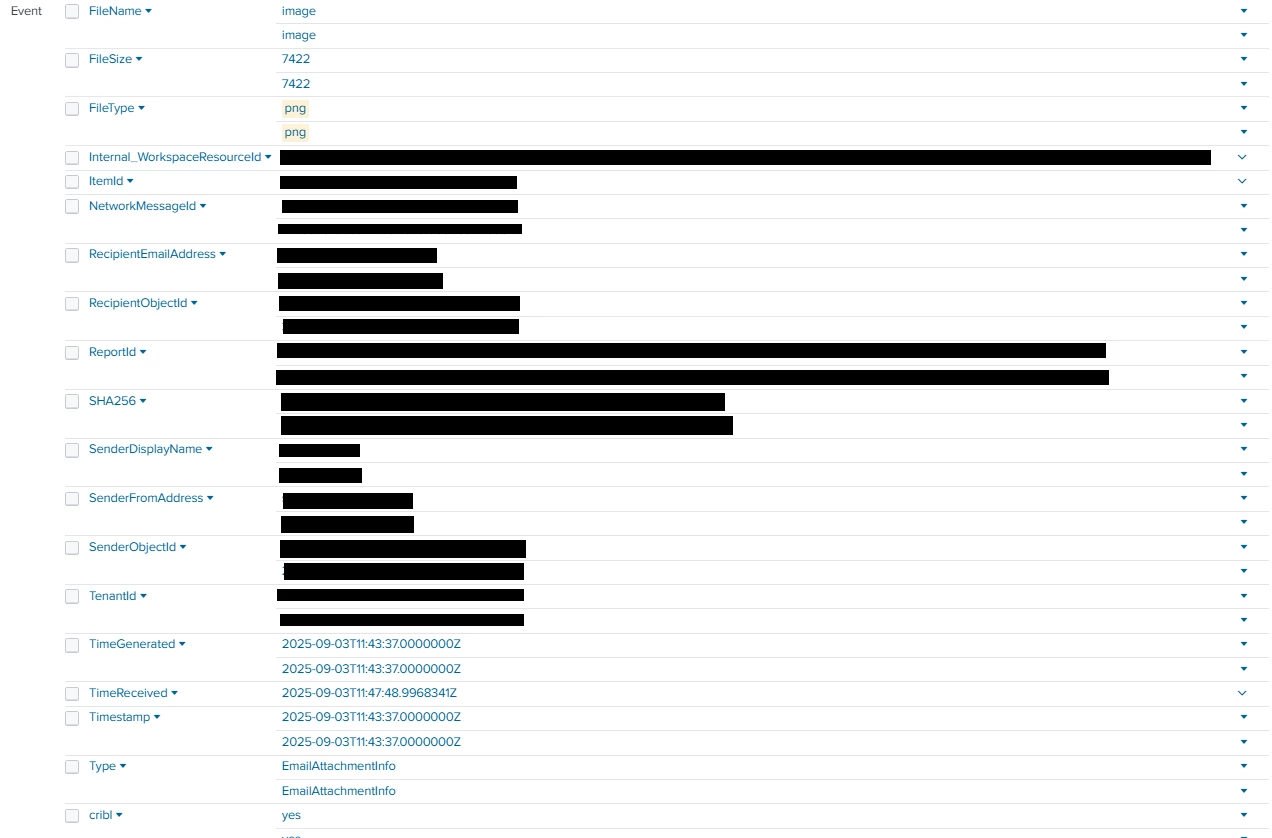
I’ve identified that extracting nested values is causing this anomaly in Splunk.
I’ve tried numerous approaches to resolve it:
-
Replaced the Flatten function with an Eval expression like that:
Object.assign(__e, Object.assign({}, __e, __e.rec || {})); delete __e.rec; delete __e.records; -
Tested various JavaScript snippets in Code functions
-
Used JSON Unroll and JSON Decode functions
-
Toggled KV_MODE, AUTO_KV_JSON, and INDEXED_EXTRACTIONS on Heavy Forwarders and Search Heads
None of these solutions work consistently; in some cases values were even triplicated.
Do you have any suggestions to resolve this issue?
Thank you in advance for any insights or working examples.