Solved

REST Collector JSON response getting split into fragments (OData JSON:single-object / fallback) — cannot parse/unroll array

  • May 20, 2026
  • 2 replies
  • 39 views

Hi,

I am facing an issue while using a REST API source (Cohesity audit logs).

The API returns a valid JSON response in this format:

However, in Cribl preview/capture, the data is not coming as a single complete JSON object. Instead:

  • One event contains the correct full JSON
  • Other events are split fragments (starting mid-string, not valid JSON)

Example behavior:

  • Event 1 → valid JSON object ({"auditLogs": [...]})
  • Event 2+ → partial JSON fragments (missing opening {, starting inside fields)

Because of this:

  • JSON.parse(_raw) fails or behaves inconsistently
  • JSON Unroll cannot work reliably
  • Derived fields (e.g., TimeGenerated) are null
  • Parsing becomes impossible for many events

Observations:

  • cribl_breaker shows OData JSON:single-object
  • Sometimes fallback behavior is applied
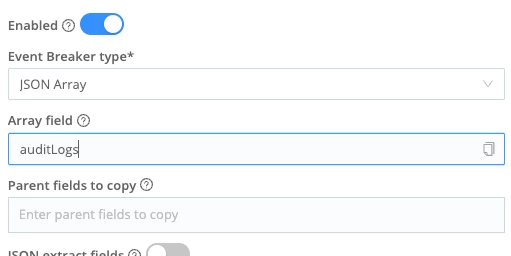
  • Custom event breaker with JSON Array also did not produce consistent results
  • Pipeline-level filtering/parsing only works partially because upstream data is already fragmented

Question

How can we ensure that the REST API response is treated as a single intact JSON event before parsing?

Specifically:

  • How to prevent Cribl from splitting a valid JSON body into fragments?
  • What is the correct event breaker configuration for a wrapper JSON with an array (not standard OData format)?
  • Is there a recommended approach for handling large JSON responses in REST Collector?

Thanks.
Best answer by Dan Schmitz

!-->

This is a classic event breaker configuration issue. The REST Collector is receiving the full JSON response from the Cohesity API, but the event breaker is splitting it into fragments instead of treating the whole response as a single event.

Your approach is solid.  And it sounds like you’ve tried the Event Breaker JSON Array route.

1. Set the correct Event Breaker

In your REST Collector config, go to Event Breaker and make sure it's set to handle your response format correctly:

  • If the API returns a single JSON object (like {"auditLogs": [...]}): Use the JSON Object breaker type with a custom Event Breaker Rule.
  •  

  • If the API returns paginated/chunked responses: The REST Collector may be making multiple HTTP requests (pagination), and each chunk is being broken incorrectly. Check if your collector has pagination configured and whether the nextUrl or pagination settings are causing partial reads.

2. Use a Pre-Processing Pipeline with Do Not Break

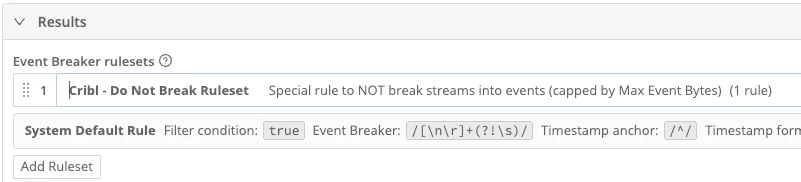
 If the JSON Array Event Breaker isn’t working you can try the Cribl - Do Not Break Ruleset


Quick diagnostic

In the Collector's Preview tab, check:

  • Does a single request show the full JSON in one event, or is it already fragmented?
  • If it's already fragmented in preview, the breaker is the culprit — switch from OData to a simpler JSON breaker
  • If it looks fine in preview but breaks at runtime, it could be a buffer/chunking issue at the HTTP layer

TL;DR: Switch the event breaker to the plain JSON Object breaker, and if needed, add a pre-processing pipeline with JSON Parse + Unroll to handle the array.

2 replies

  • Employee
  • Answer
  • May 22, 2026

!-->

This is a classic event breaker configuration issue. The REST Collector is receiving the full JSON response from the Cohesity API, but the event breaker is splitting it into fragments instead of treating the whole response as a single event.

Your approach is solid.  And it sounds like you’ve tried the Event Breaker JSON Array route.

1. Set the correct Event Breaker

In your REST Collector config, go to Event Breaker and make sure it's set to handle your response format correctly:

  • If the API returns a single JSON object (like {"auditLogs": [...]}): Use the JSON Object breaker type with a custom Event Breaker Rule.
  •  

  • If the API returns paginated/chunked responses: The REST Collector may be making multiple HTTP requests (pagination), and each chunk is being broken incorrectly. Check if your collector has pagination configured and whether the nextUrl or pagination settings are causing partial reads.

2. Use a Pre-Processing Pipeline with Do Not Break

 If the JSON Array Event Breaker isn’t working you can try the Cribl - Do Not Break Ruleset


Quick diagnostic

In the Collector's Preview tab, check:

  • Does a single request show the full JSON in one event, or is it already fragmented?
  • If it's already fragmented in preview, the breaker is the culprit — switch from OData to a simpler JSON breaker
  • If it looks fine in preview but breaks at runtime, it could be a buffer/chunking issue at the HTTP layer

TL;DR: Switch the event breaker to the plain JSON Object breaker, and if needed, add a pre-processing pipeline with JSON Parse + Unroll to handle the array.


  • Author
  • New Participant
  • May 25, 2026

Thank You it was helpful.

Also what i did i configured my Api such a way that it pulls only last 1 hours of logs so Json Arry is small and event breaker can work properly